
Studio · 3D
From a sentence to a model.
Describe it or drop in a picture, and Meshy makes the model: printable, multi‑colour or rigged.
Studio, 3D and Motion come with a license.

The 3D agent
Claude plans the model with you and quotes each run. Every paid run it asks for waits on the approval card.
Next steps
Texture, print check, make printable, multi-colour 3MF, split, retexture, remesh and rig.
Your library
Every model and its files stay on your Mac. Trash moves a model aside and never deletes it.
Motion
Short films, written as code.
Describe a clip and Claude writes it as code. It renders on your Mac.
One film, one clock
A clip draws any moment you ask for, so the preview shows the same frames the render makes.
No network
The preview and every render run with the network shut off.
Sound, made
Every sound is synthesized. No sample packs.
A review first
A fresh Claude reviews the draft. The master renders only after its YES.
And the rest
Design beside your code.
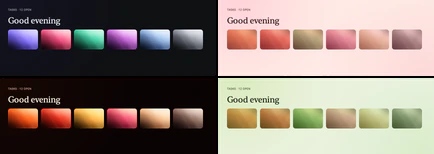
Eleven themes
Seven dark and four bright, each with its own backdrop. Iris is the default.
Vector design
A full vector editor opens inside Squah, beside your agents, and Claude can work in it with you.
Blender and Adobe
Studio opens your Blender and Adobe apps, renders After Effects projects and runs Photoshop and Illustrator scripts.
